
We build your firm its own software, shaped around how you work.
One system in place of the separate programs and spreadsheets you run on today, so each job is typed in once and everyone can see where it stands. We build it in stages and look after it. You own it, and it has no per-user fees.
Book a callDrag to compare
Planned with you. Built in stages.
Nothing comes off a shelf. Each system starts from how your firm works, and each stage is live and in use before the next one starts.
Step 1
We map how your firm works.
We sit with each team and follow real jobs from enquiry to payment. You see the whole plan before anything is built.
Step 2
We build it in stages.
Our senior software architects design each stage. Much of the code is written with AI coding tools, then tested and checked by them before it goes live. Your records are moved across.
Step 3
We look after it.
Fixes, changes as your business changes, and updates when Microsoft or your accounts software change theirs.
Step 4
You own the system.
It runs in your company’s own accounts, and the system has no per-user fees. You can take over running it or end our support at any time.
We design it around everyone who touches a job.
No two firms get the same system. These screens show the kind we design, set up here for a building services contractor. Choose an area to look around, then picture it with your own jobs, steps and words.
A building services firm
Yours might need
- Site diaries
- Plant and hire
- Timesheets
- Stock and vans
- Subcontractors
- Servicing
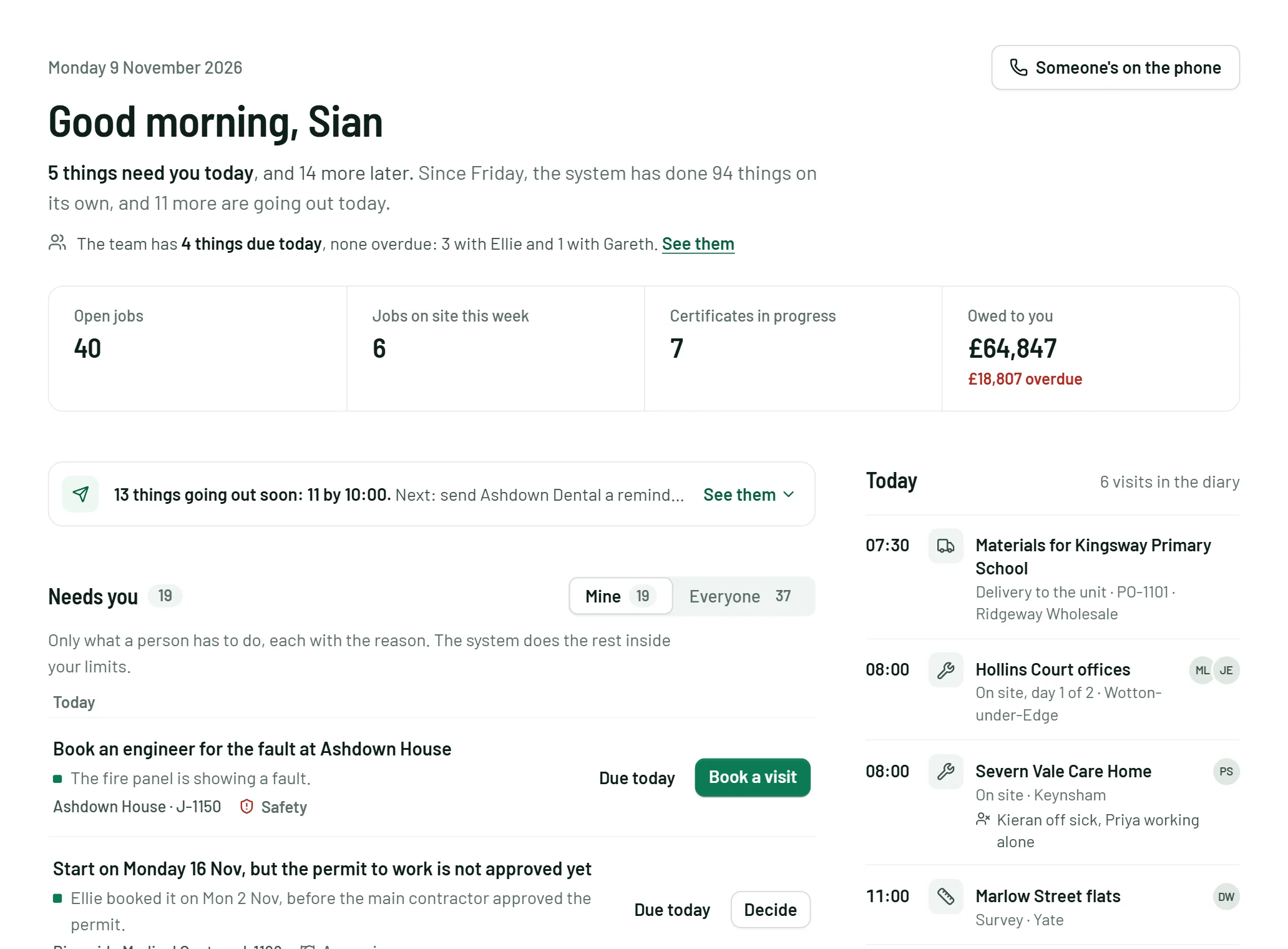
Swipe the screen to see the rest of it.
An engineer, on site
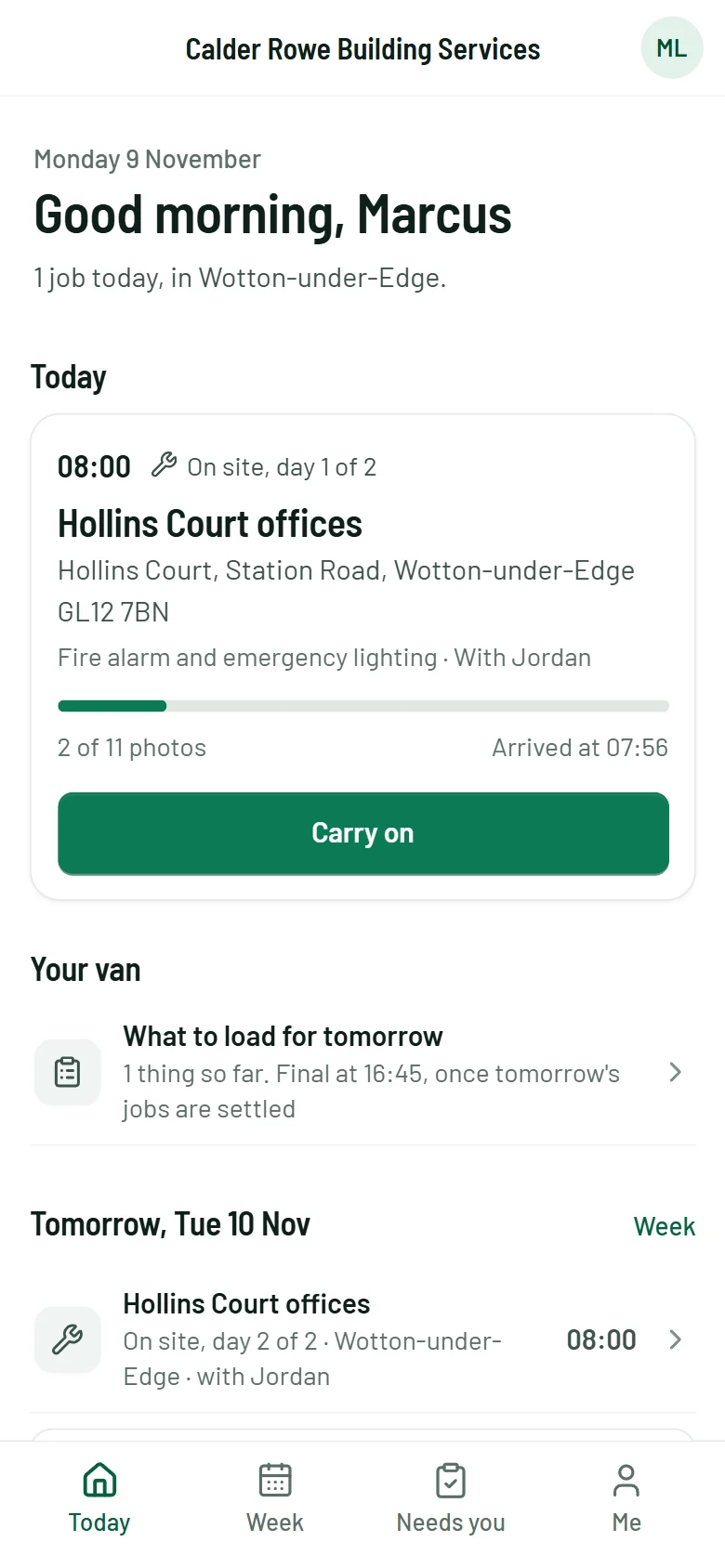
Each person starts the day with what needs them, and the engineers get their day’s work on the phone.
Yours might needSite diariesPlant and hireTimesheetsStock and vansSubcontractorsServicing
At this firm, each job lives on one record, from order to final payment.
- 18 September
The client’s order comes in
Brook Park Estates’ purchase order is read from the inbox and matched to the quote. The job opens with everything from the quote and the survey already on it.
Done by their system
- The same day
The materials are ordered
The detectors, panel and cable come off the quote and go to the firm’s usual wholesaler, inside the limit it set. The delivery is booked to land before the team does.
Done by their system
- 27 October
The team arrives with everything
Marcus and Jordan have the job, the drawings and the materials list on their phones. The client got the dates when it was booked, and a reminder the day before.
Done by their system
- On site
Photos, test readings and sign-offs
Logged from the phone as the work is done, with or without a signal. Each reading is checked against the design as it is typed in.
Done by their team
- Handover
The certificates are prepared
The commissioning certificate and the handover pack are filled in from what is already on the job. Two sources disagree on the detector model, so it asks before anything is sent.
A person decidesIt isn’t sure
- 1 November
Paid, matched and in Xero
The final invoice went out at handover. The payment is matched from the bank feed and recorded in Xero. Materials, labour and access equipment sit against the job, so the firm knows what it made.
Done by their system
It can take on the routine office work. You set the limits.
We build in whichever routine jobs your office does by hand. At this firm there were seven, one desk each. Tap a desk, or a job in the list, to choose who does it.
Tap a desk to change who does the job.
- 94done on its own since Friday
- Everything it did is in one place, and anything going out can be stopped.
- 5need a person today
- It asks only when it can say why.Yours by lawMoney or a promiseIt isn’t sure
- 1job done by hand
- What it may spend and who it may contact are the firm’s rules, checked every time.
Your team can ask it from Copilot or Claude.
We connect it to the assistant each person already uses. Here, three people at the same firm ask about the same job, and each sees only what their role allows.
Unit 4, Brook Park
- Visits and design, open
- What is outstanding, open
- Paperwork, open
- Invoices and payments, open
- Costs, open
- Margin, open
CopilotDirector
 Copilot
How is the Brook Park job doing?
Unit 4 at Brook Park was handed over on 28 October and is paid in full. The commissioning certificate is waiting on one answer about the detector model.
The materials came to £4,610, inside their limit. The job made 44% after materials, labour and access equipment.
From: Job record, Xero
The director sees every part of the job, costs and margin included.
It replaces the software that doesn’t join up and connects to what stays.
- Job management software
- The scheduling and engineer app
- The CRM and the quoting tool
- Stock, hire or workshop software
- The spreadsheets that fill the gaps
- Their per-user fees, which grow with every hire
- Your accounts: Xero, Sage or QuickBooks
- Microsoft 365, Outlook and Teams
- Your bank and card feeds
- Supplier and customer portals
- Copilot or Claude, for each person








Questions owners ask us.
Is this a software package we sign up to?
No. A package, even an all-in-one one, makes your firm bend to fit it. We build a system for your firm alone, around the way your teams already work, and you own it.
Our software works. Why replace it?
Each product works on its own. The trouble is between them: the same job typed in again and again, ringing round to find out where a job stands, no clear view of what a job really made, and new starters learning four programs. One system keeps one record of each job, so that work goes away.
Is there a fee for each person who uses it?
No. You own the system, so it has no fee per user and no renewal to dread. A new starter, a subcontractor or a whole new team can use it without another subscription. You pay for what we build and for us to look after it, plus the running costs of your own cloud account. Tools you keep, such as Microsoft 365 or Copilot, are still billed by their makers as before.
Do we have to replace everything at once?
No. We plan the whole system first so the parts join up, then build it in stages. Your current systems keep running until each stage is ready.
What stays as it is?
Your accounts software, Microsoft 365 and your bank feeds. The new system connects to them, so nothing is typed in twice.
What can it cover?
Whatever your firm runs on. Quotes and estimating, jobs and scheduling, an app for the people on site that works without a signal, site diaries, timesheets, materials and stock, plant and hire, inspections and certificates, subcontractors, invoices and a page for your customers. We build the parts your firm needs and leave out the rest.
Isn’t bespoke software slow and expensive?
It used to be. Our senior software architects still design every system: how the records fit together, who sees what, and how it connects to what you keep. Much of the code is now written with AI coding tools, then tested and checked by the same people, with automated tests and security checks, before anything goes live. So you see working screens early, and your budget buys more of the system.
Can the AI run on our own servers?
Yes. The AI inside the system can be private: a model that runs on your own server or in your own cloud account in the UK, so your records are not sent to an outside AI provider. Firms that are happy with Copilot or Claude can use those instead.
What does it cost?
A fixed price for each stage, agreed before that stage starts, then a monthly fee for looking after it. We give you figures once we have mapped your systems.
Who owns it?
You do: the system, its code and your records. It runs in your company’s own accounts from day one, so you hold the keys, not us. You can take over running it or end our support at any time.
What happens when something goes wrong?
You reach the people who built it. Fixes are part of the monthly fee, and bigger changes are priced before we start. We keep it working when the software around it changes.
What if something happens to Hexaa?
The system keeps running, because it runs in your accounts, not ours. It is built on common, well-known technology that another developer could pick up. We have been building software for clients since 2016.
Could an AI coding tool build this for us?
It can write code quickly. The harder parts are knowing how your firm really works, moving years of records without losing any, and keeping the system right as things change. That is the work we do.
Tell us how your firm runs today.
We’ll map what a system of your own would replace, and what it would keep.