
How we built AI that chases suppliers for missing certificates
It matches every order in Excel to the documents it needs, asks suppliers for what’s missing and shows the team what’s still outstanding.
- Private AI
- Excel
- Outlook
 Private AI
 Excel
 Outlook
- Client
- UK maker of pumps and valves
- Documents
- Material certificates, test records, statements of compliance and datasheets
- What we built
- AI that matches documents to orders and chases suppliers
- Where it runs
- The company’s own server, working with Excel and Outlook
- Who checks
- Purchasing approves anything unusual
Three places that did not talk
The order book was in Excel, certificates arrived in the Outlook inbox and the files sat in a shared folder. One person in purchasing checked every attachment by hand.
What each order line needs
Order 24117, line 2 is eight gate valves, and the customer wants four documents with them. The list sits in a short table in the same workbook, so when a customer’s needs change, the team changes the table.
Joined up, not replaced
We connected the order book, the inbox and the shared folder to AI on the company’s own server. Nobody copies orders into a new tool, and suppliers keep emailing the same inbox.
Every attachment read
As each email arrives, the AI reads its attachments, even scans and phone photos. It pulls out the purchase order, part number, quantity, material grade, certificate type and heat number.
Checked, then filed
The AI reads, and plain checking rules decide: each document is compared with the purchase order and the goods received. A match is filed in the order’s folder and the line is marked as having it.
A wrong certificate is caught
The foundry’s material certificate names part GV‑080‑16, an 80 mm valve body. The heat number reads clearly, but the order is for GV‑100‑16.
Held for a person
Filing it would make the line look complete when it is not, so it is held. Purchasing sees the order and the certificate side by side and decides what happens next.
One polite email per supplier
The system drafts one email to the foundry from the purchasing inbox. Each item quotes the purchase order, the part number and the document needed.
A person approves it
Because a certificate was wrong, someone in purchasing approves the email before it goes. Routine reminders go out on a schedule the team agreed.
On their own server
The AI reads the documents on the company’s own server, because some customer contracts require drawings to stay on site. Email carries on through the firm’s normal email service.
What is still outstanding
One view shows what is missing by order and by supplier, what has been chased and what is waiting for purchasing. The same status shows in a new column in the order book.
Read the full story
Every valve that leaves the works needs the paperwork its customer asked for, such as material certificates, test records, a statement of compliance and a datasheet. The order book is in Excel and the certificates arrive by email in Outlook, so somebody spent their week chasing and cross-checking. We built a system that does that chasing.
The valves are ready. The paperwork is not.
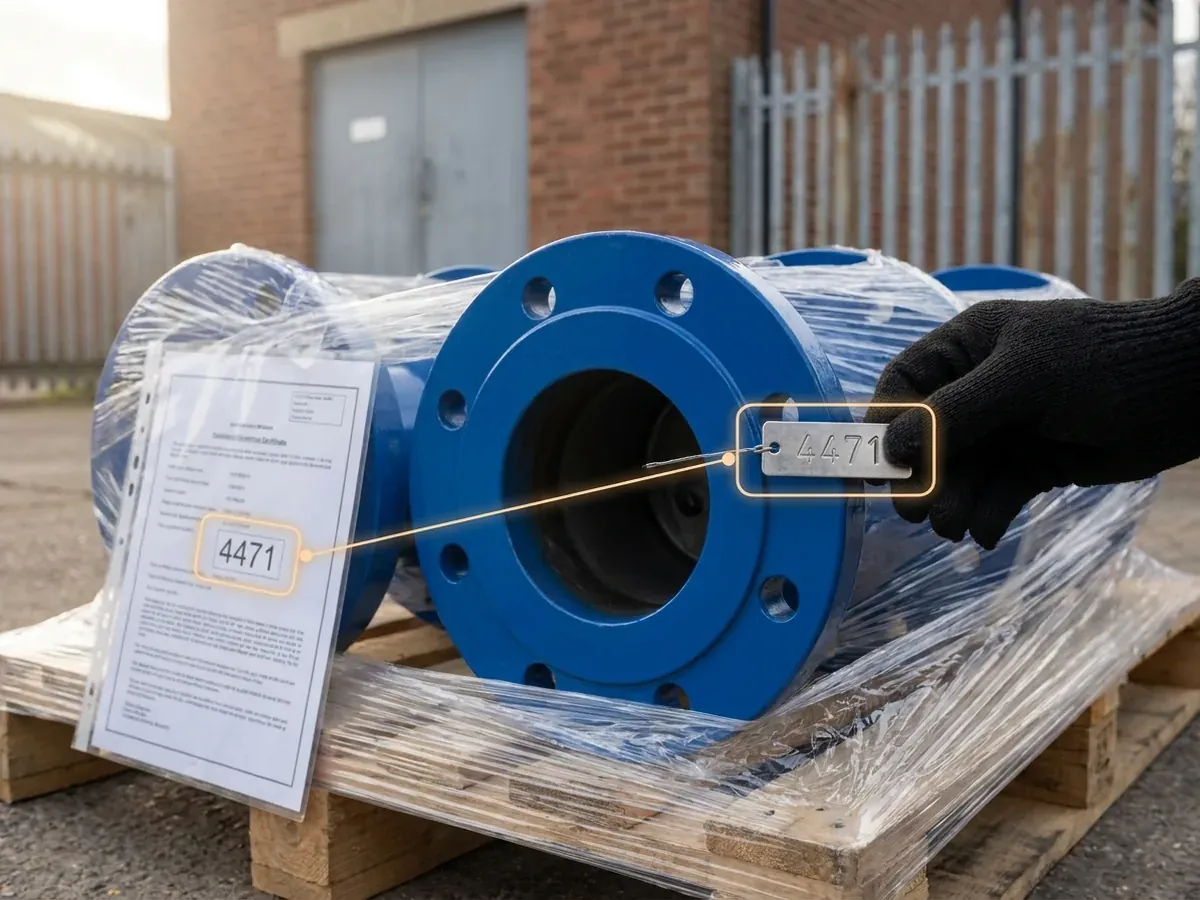
Our client makes valves and pumps. Each order line names the documents the customer wants with it. For a run of eight gate valves, that might be a 3.1 material certificate for the valve bodies, the test records for the finished valves, a statement of compliance and a datasheet.
The order book is a large Excel workbook. The certificates come from foundries, motor suppliers and seal makers by email, often as scans, sometimes as photos, sometimes for the wrong part. The test records come from the works’ own test team. One person in purchasing opened each attachment, checked it against the order, saved it to the right folder and kept a list of what was still missing. When the list got long, the chasing was done by phone.
A missing certificate tended to surface when a customer refused to accept a delivery without it, or when an invoice was held until the paperwork was complete. The director could not see which orders were waiting for paperwork without asking purchasing to check.
Checking what each order needs.
The system reads the order book where it is. Each line has an order number, a part number, a quantity, a supplier, a purchase order and a due date. Nobody has to copy orders into a new tool.
Quality and purchasing agree which documents each order needs and record them in a short table in the same workbook. For the order in the walk-through above, the customer asks for 3.1 material certificates for the valve bodies, the test records for the finished valves, a statement confirming the valves comply with the order, and a datasheet. What an order needs depends on the product, what it will be used for and the customer’s specification. When a customer’s requirements change, the team changes the table, not the software.
A 3.1 material certificate records inspection results for the supplied material. Its heat number identifies the batch of metal.
Using the order details and document requirements, the system lists what is missing from each open order line and who should send it.
Every attachment read and matched as it arrives.
Suppliers keep sending certificates to the same purchasing inbox in Outlook. Nothing changes for them.
When an email arrives, the AI reads each attachment, including scans and phone photos. It works out what kind of document it is and pulls out the details that matter: the purchase order, the part number, the quantity it covers, the material grade, the certificate type and, for castings and forgings, the heat number.
Ordinary checking rules then compare the certificate with the purchase order and the goods-received record: the part number, the material grade, the certificate type, the heat or batch number, and whether every delivered item is covered. Is it the 3.1 certificate the customer asked for, or a 2.2? Does it cover all eight valve bodies, or only six? The AI reads; the rules decide whether it matches. Unclear matches and questions about test results go to the quality team.
A matched certificate is saved against the delivery and the order line, in the order’s folder under a consistent name, and the line in the order book is marked as having it. If an order holds several batches, each batch keeps its own certificate link, so every heat number can be traced later without opening the PDF.
- Read. Pull the purchase order, part number, quantity, material grade, certificate type and heat number from each attachment.
- Match. Find the order line it belongs to and check each detail against the purchase order and the goods-received record.
- File. Save it against the delivery and the order line, and mark the line as received.
- Hold. Anything unclear waits for purchasing or the quality team, with the reason shown.
A wrong certificate is held, not filed.
In the walk-through above, the foundry sends a material certificate for order 24117. The heat number is there and readable, but the part number is GV-080-16, an 80 mm valve body. The order line is for GV-100-16. Filing it would make the line look complete when it is not.
So the certificate is held. Purchasing sees the order line and the certificate side by side, with the part number marked on both. The same happens when a certificate covers fewer items than were delivered, when a 2.2 arrives where a 3.1 was asked for, or when a scan is too faint to read the heat number with confidence.
A person decides what happens next. Sometimes the supplier has simply attached the wrong file. Sometimes the order line itself is wrong. The system never quietly corrects either one.
One polite email per supplier, quoting exactly what is missing.
Ahead of each due date, the system writes to the supplier from the purchasing inbox. It gathers everything that supplier still owes across all open orders into one email, so a foundry gets one clear list rather than five separate reminders. Each item quotes the purchase order, the part number and the document needed.
Routine reminders use wording approved by the team and follow an agreed schedule. Anything unusual waits for a person to approve it first: a certificate that was wrong, a supplier who has asked a question, or a third reminder for the same item. The system checks replies and attachments in the same inbox, and closes an item only when the certificate matches.
The phone calls do not disappear. They become the exception, made by someone who already knows exactly what to ask for.
One view of what is still missing, by order and by supplier.
Before, the information lived in three places that did not talk to each other: the order book, the inbox and the shared folder. Now the system moves it between them. A certificate that arrives by email is checked against the spreadsheet, saved in the folder and shown against its order without anyone retyping it.
The outstanding view is a simple page on the company network, and the same status shows in a column in the order book for anyone who lives in Excel. It answers the questions directors ask: which orders cannot ship because of paperwork, which suppliers are behind, what has been chased and when, and what is waiting for someone in purchasing to look at.
Each item shows when it was last checked. If the inbox or the workbook cannot be reached, the view says so rather than showing an empty list that looks like good news.
Where the AI reads the documents.
The AI runs on the firm’s own server, because some customer contracts require drawings to stay on site. Email carries on through the firm’s normal email service.
We build with Claude, GPT and Copilot on other projects; here it is about where the reading happens.
It started by reading, then it was allowed to chase.
We started with one group of suppliers. In the first release the system only read and reported: it matched certificates and showed what was outstanding, and the team compared that with their own list.
Once they trusted the matching, chasers were switched on with a person approving every email. Routine reminders go out on their own only when the team is happy with them. The test cases included wrong part numbers, part quantities, unreadable scans, a supplier replying from a new address and the inbox being unavailable for an hour.




How much of your week goes on chasing paperwork?
Show us your order book and a few supplier emails. We’ll show you the matching and chasing on your own orders.